B2B · Internal tool · Automotive · 2024-today
Campaign & Invoice Dashboard
The client asked for a reporting dashboard. Research revealed a more pressing need: helping campaign teams resolve rejected invoices.
Context
A 0-to-1 internal web tool for a client in the automotive industry. Its campaign-team runs scaling promotional campaigns in which customers submit invoices to claim a benefit. Their existing tools couldn't keep up real-time control.
The team
8 people
Internal design:
Njomza Llaloshi (PM)
Jasmin Cziborra (UX Design)
Theo Steuernagel (UI Design)
External (client side)
1 Section Lead
2 Campaign Stakeholder
4 Engineers
My role
UX Design
→ Concept phase together with a second UX designer
→ Detail phase as the only UX designer on the project
Timeline
2024 to today. The product is in development, so there is no usage data yet.
Challenge
The client wanted a reporting tool for campaign activity, invoice volumes, budgets, and status information. At the time, campaign management relied on four disconnected applications, spreadsheets, and conversations across departments. Even clarifying one invoice could take several days.
The initial requirements described what the dashboard should report, but left important questions about the work behind those numbers unanswered.
What I designed
The campaign detail page, invoice management with a decision history for each invoice, the role and permission model, and the display of parsed invoice data.
This project is under a non-disclosure agreement.
The client, product and internal system names have been generalised. Screens have been anonymized, and all names, figures and data shown in them are fictitious.
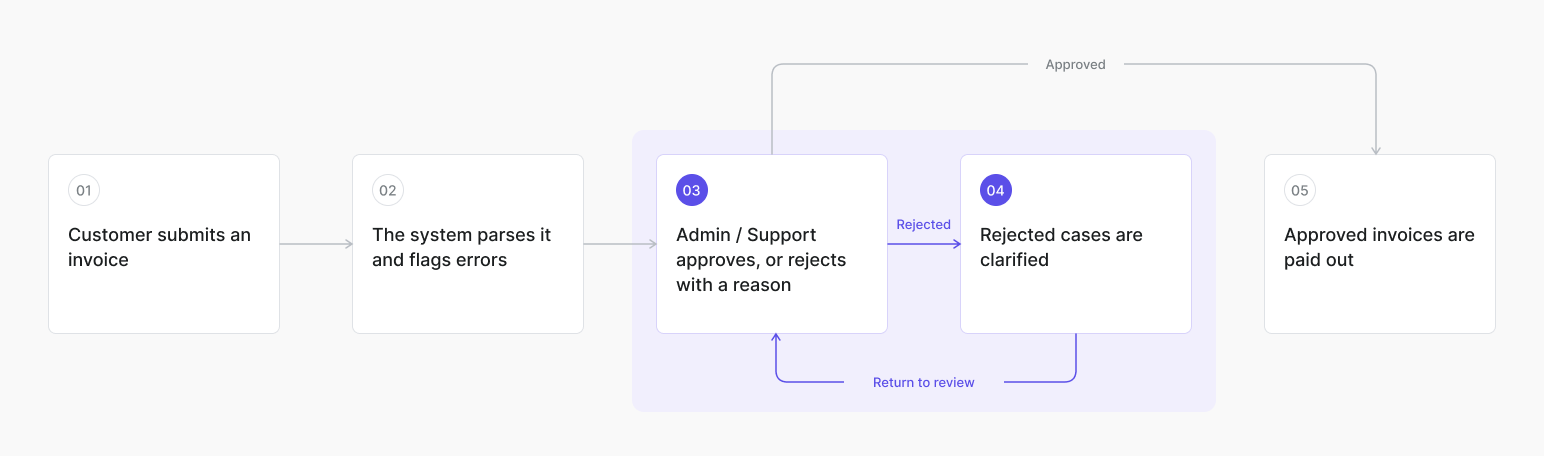
Simplified flow. Steps 03 & 04 are where the team's time went.
How an invoice reaches a decision
Invoices are submitted and automatically parsed. The system flags errors, after which Admin or Support reviews a case, approves it or rejects it with a reason, and clarifies rejected cases where needed. Approved invoices can then proceed to payout.
The important distinction is between a technical flag and a final business decision. Review and clarification may require context from several people.
The first screens were approved, while the worklow was not yet understood
I first designed the campaign detail page around the figures the client requested: incoming, valid, and faulty invoices, campaign KPIs, and status information. The campaign team approved the initial screens.
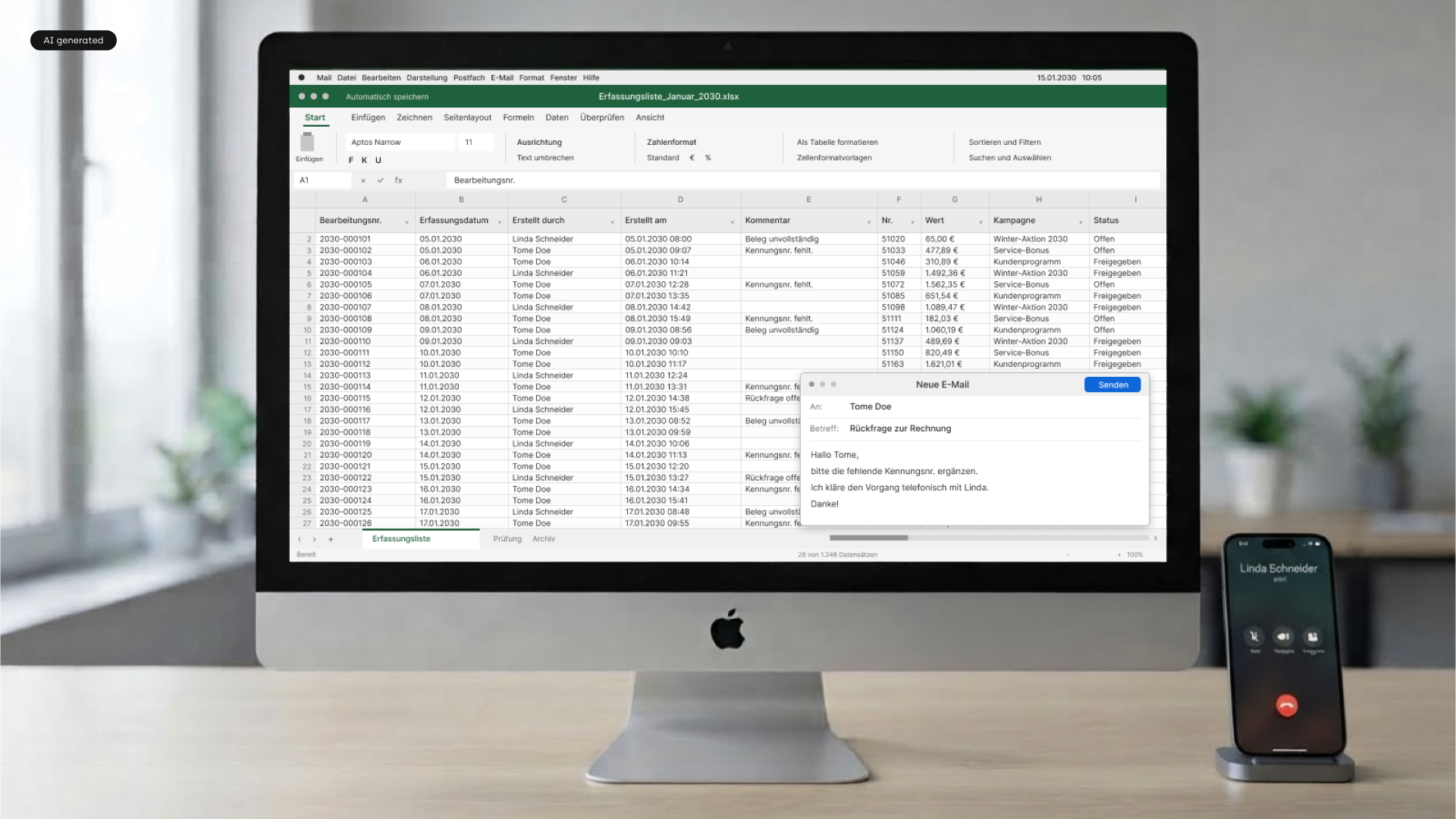
One question remained open for my UX colleague and me: what happens after an invoice is rejected? We interviewed two Campaign Organisers. They described reviewing rejected invoices and coordinating with other departments to resolve them. This was where much of their time went.
After that, reviews focused less on approving screens in isolation and more on checking them against the organisers’ actual work.
Two interviews revealed the work behind rejection
The two Campaign Organisers described an invoice workflow that depended on more than the system’s initial assessment. Rejected invoices often required further review, conversations across departments, and an understanding of campaign-specific conditions.
These interviews changed the direction of the design discussions. They were an important input from the people doing the work, but not a comprehensive validation of all invoice scenarios.
Key insight
Faulty did not mean invalid
A system flag did not always mean an invoice was invalid. Organisers reported that some rejected invoices were eventually approved. Campaign-specific tolerance ranges, retailer conditions, and coordination between departments could change the outcome.
The interface therefore needed to support human judgment: surface cases requiring attention, preserve the reason behind a decision, and show what happened next.
What the first version leaves out
The first version focused on the campaign detail page and the invoice review workflow rather than deeper reporting or automatic approval rules.
Detailed KPI analysis: interactive drill-downs and real-time charts were left for a later stage. The campaign team first needed reliable campaign-level figures and the core workflow.
Automatic decisions within tolerance ranges: an error flag alone could not establish whether an invoice should be approved. The proposed workflow kept approval decisions with the relevant people and made the reasoning visible.
The source documents these boundaries, but not a formal scoring or prioritisation method.
Detailed KPI analysis
No real-time charts with interactive drill-downs, for example regional campaign development or weekly budget behavior. The numbers the team needed fit on the campaign detail page. Deeper analysis can follow once the core workflow is in use.
Automatic decisions within the tolerance range
The system flags errors, but whether an invoice is acceptable depends on campaign circumstances that need review and coordination. The decision stays with people, and the tool makes their reasoning visible.
Decision 1
Put rejected invoices in the context of the campaign
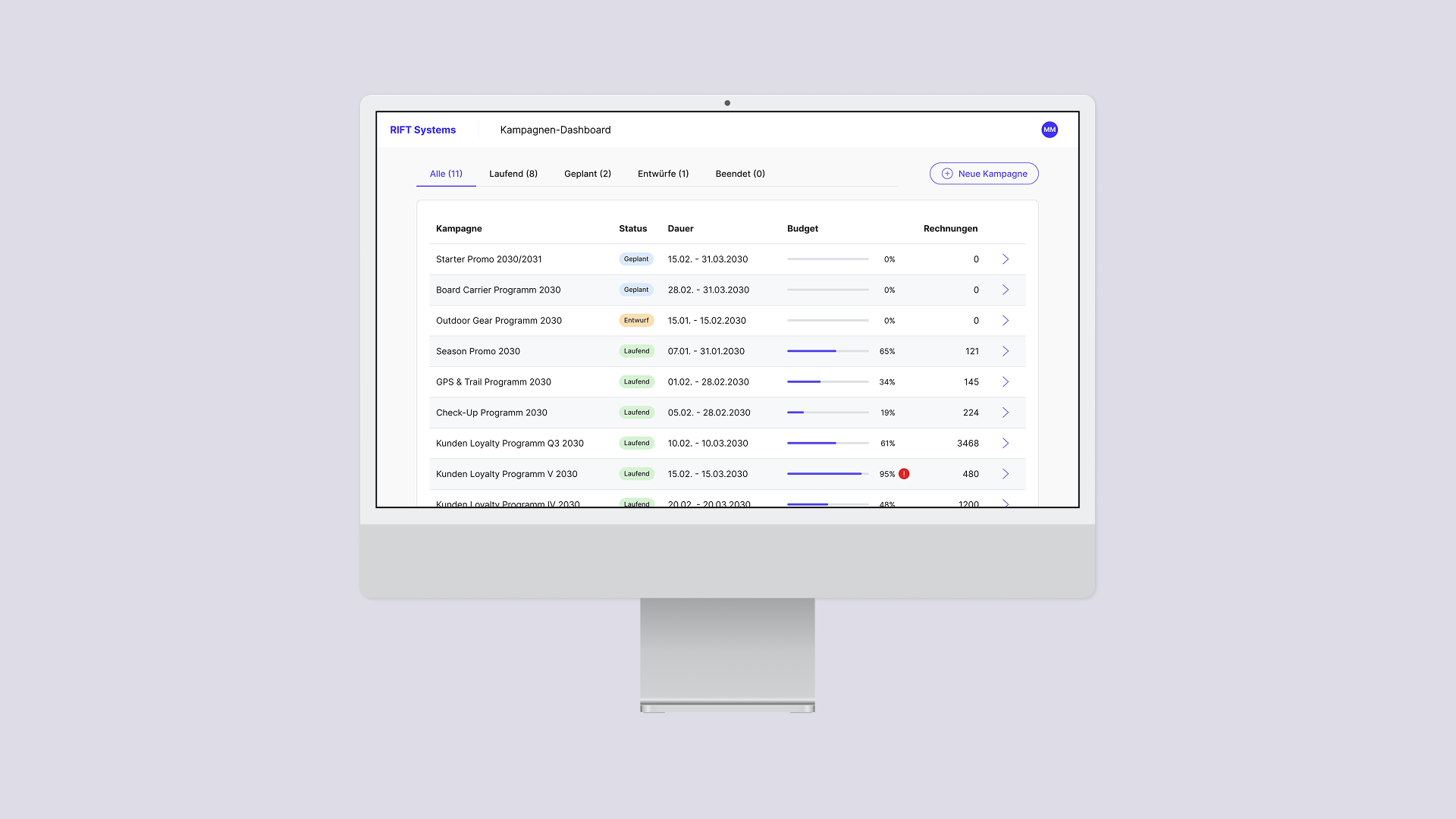
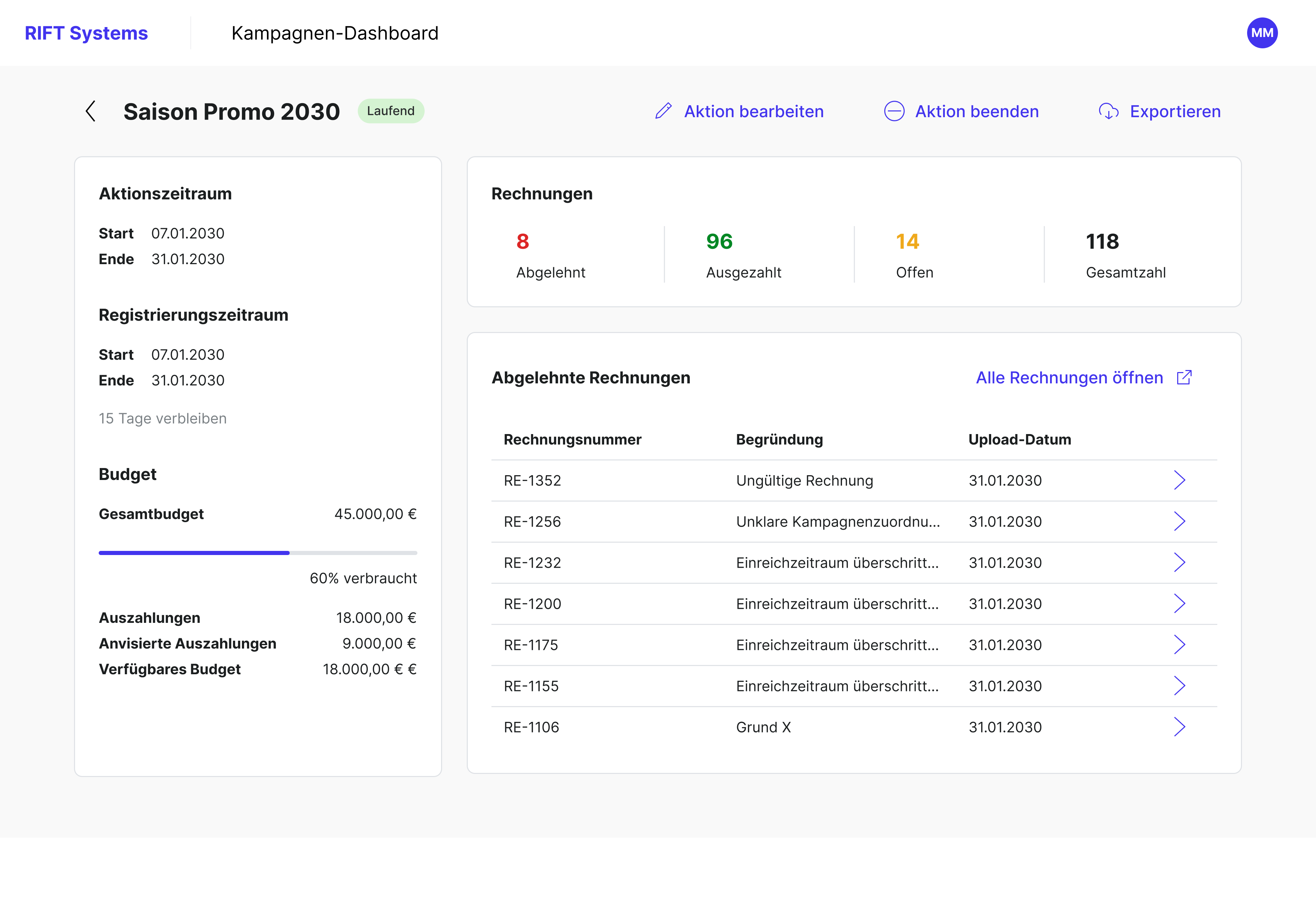
I placed a queue of rejected invoices on the campaign detail page rather than relying only on the full invoice list. It gives the team direct access to cases still awaiting clarification in the place where they manage the campaign.
The same page shows the budget broken down into paid, committed, and available amounts. This matters because approving a previously rejected invoice can affect the remaining budget. The complete, filterable invoice list stays one click away.
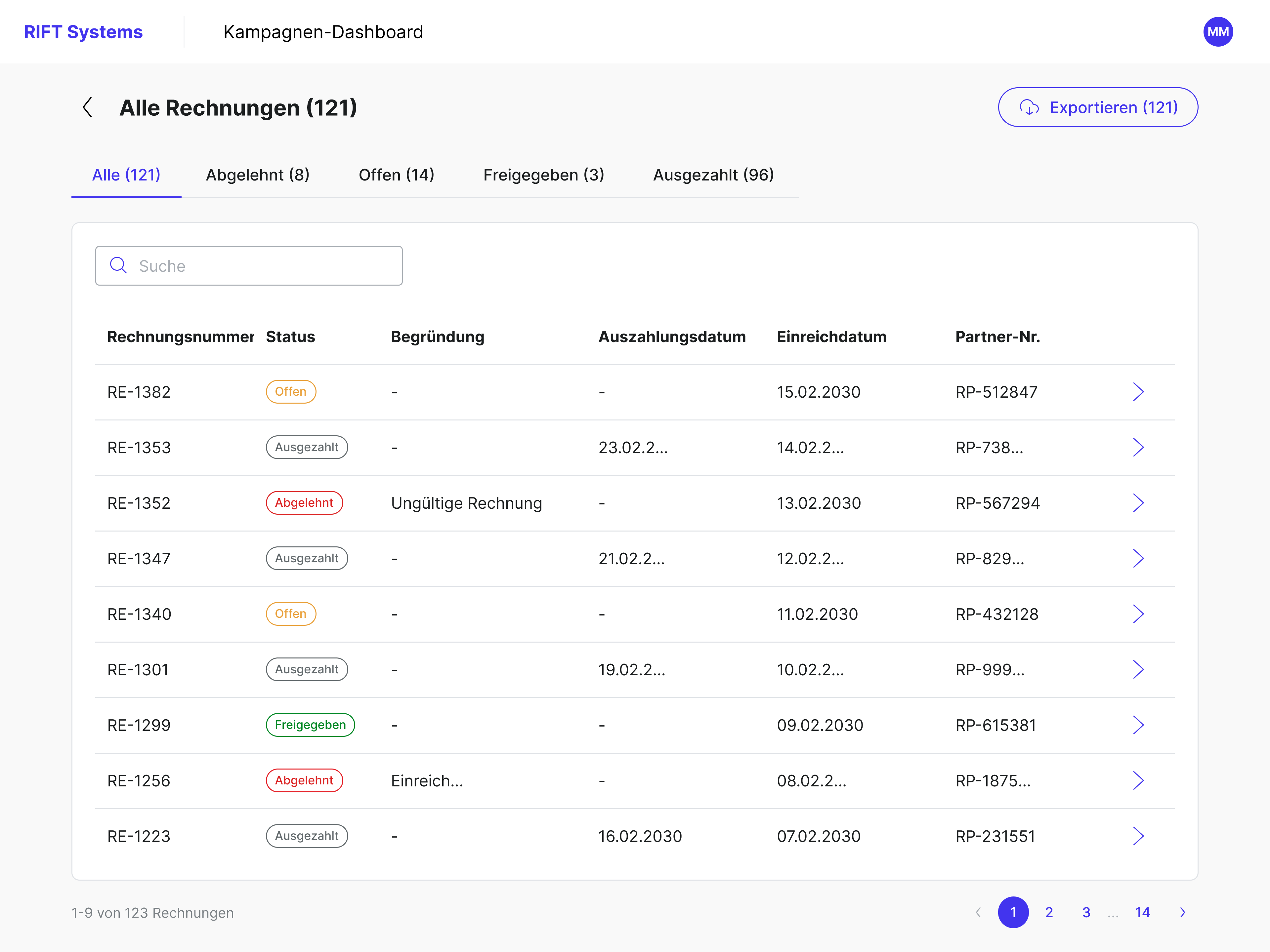
Campaign-specific invoice overview with status-based tabs, helping users filter invoices and access individual cases.
Decision 2
Make the reason and outcome traceable
A rejected invoice could later be approved, so the reason behind each decision was as important as the status itself. The team already used standard rejection wording, but it was stored separately from the invoice case.
I made the rejection reason a required field on the invoice case and designed a history of decisions and comments. For two critical outcomes, approving a previously rejected invoice and rejecting it finally, I defined what happens next for the customer, the budget, and the case status.
The concept keeps the explanation alongside the case instead of depending on colleagues to reconstruct it elsewhere.
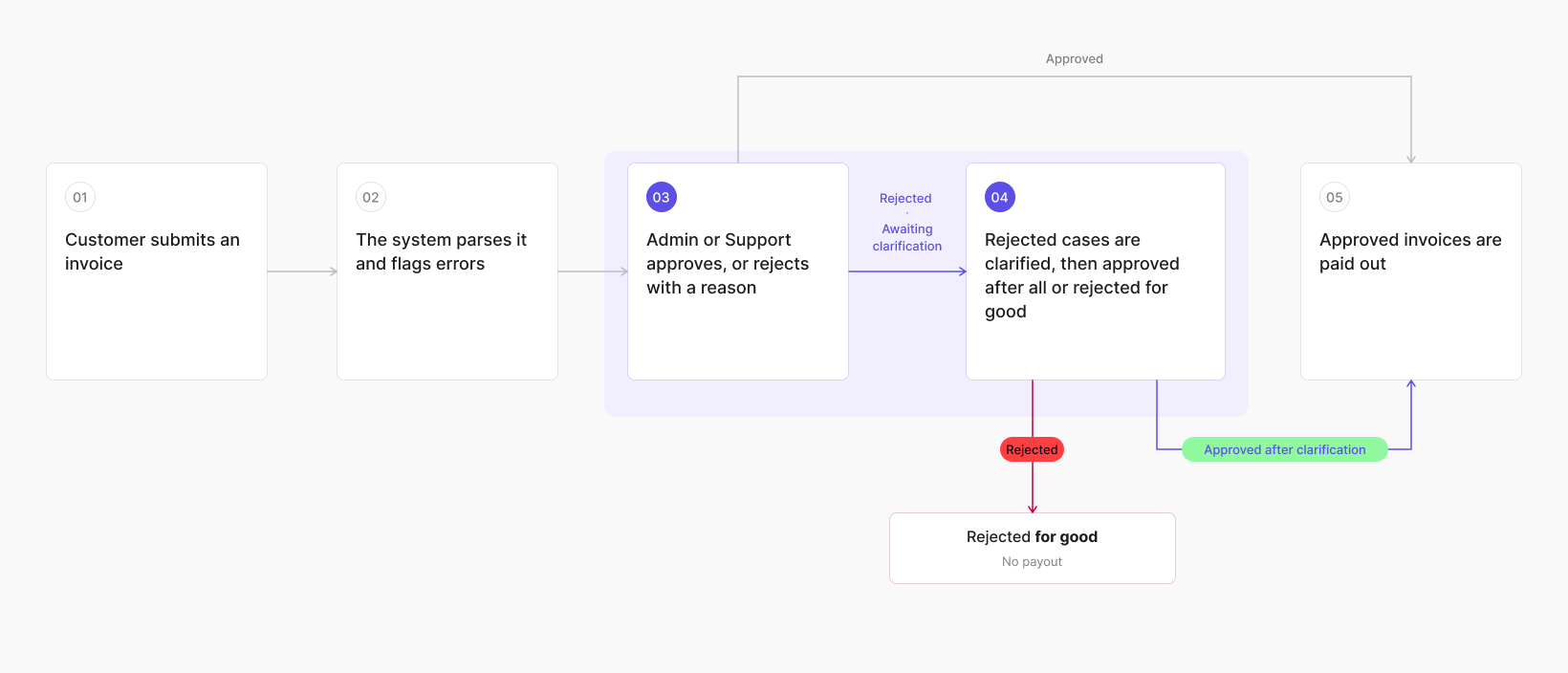
Reconstructed diagram of an invoice case.
Review & Approval of an invoice
Decision 3
Match permissions to responsibilities
Reviewing invoices involved people from multiple departments, which made access to the right information and actions important.
The concept included three roles:
Admin
Can manage campaigns, invoices, roles, and permissions
Support
Can handle invoices, including approvals and rejections but cannot change the campaign
Read-only
Can view campaigns and invoices without editing.
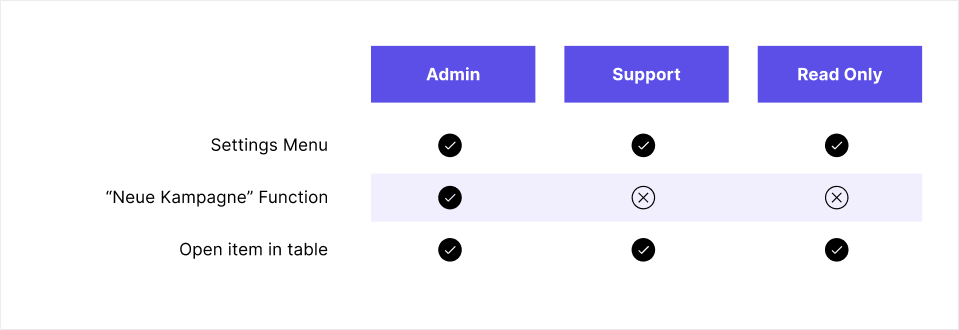
I designed the flows for creating roles and assigning permissions, drawing on established role-management patterns. The case history helps people joining a case understand earlier decisions.
Decision 4
Show parsed invoice data and errors where decisions are made
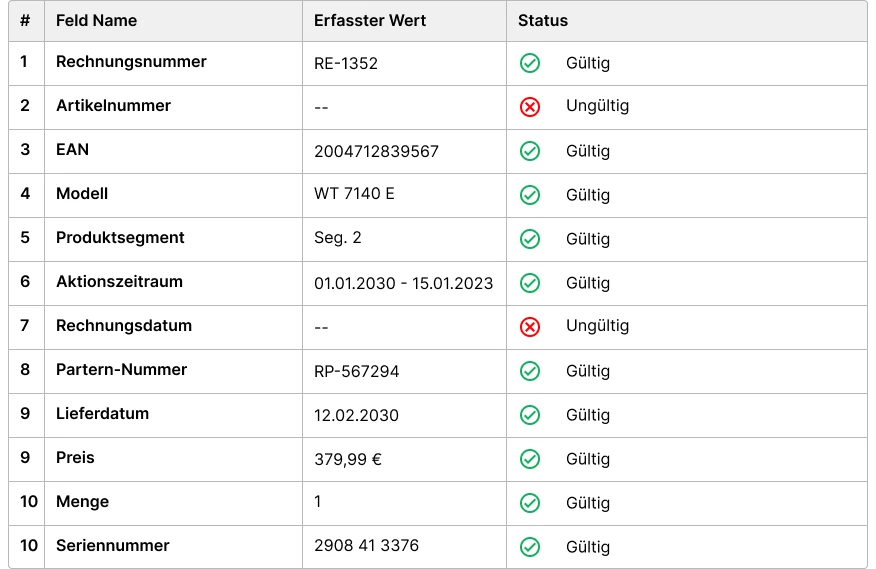
Invoices were parsed automatically before review. For the invoice detail view, I selected the parsed fields relevant to the team’s decision and defined how parsing results and errors should appear in the interface.
The current material does not explain which fields were prioritised or how different error states behave. An annotated example would make this contribution easier to evaluate.
Invoice list concept with status filters, search, and direct access to individual invoice cases.
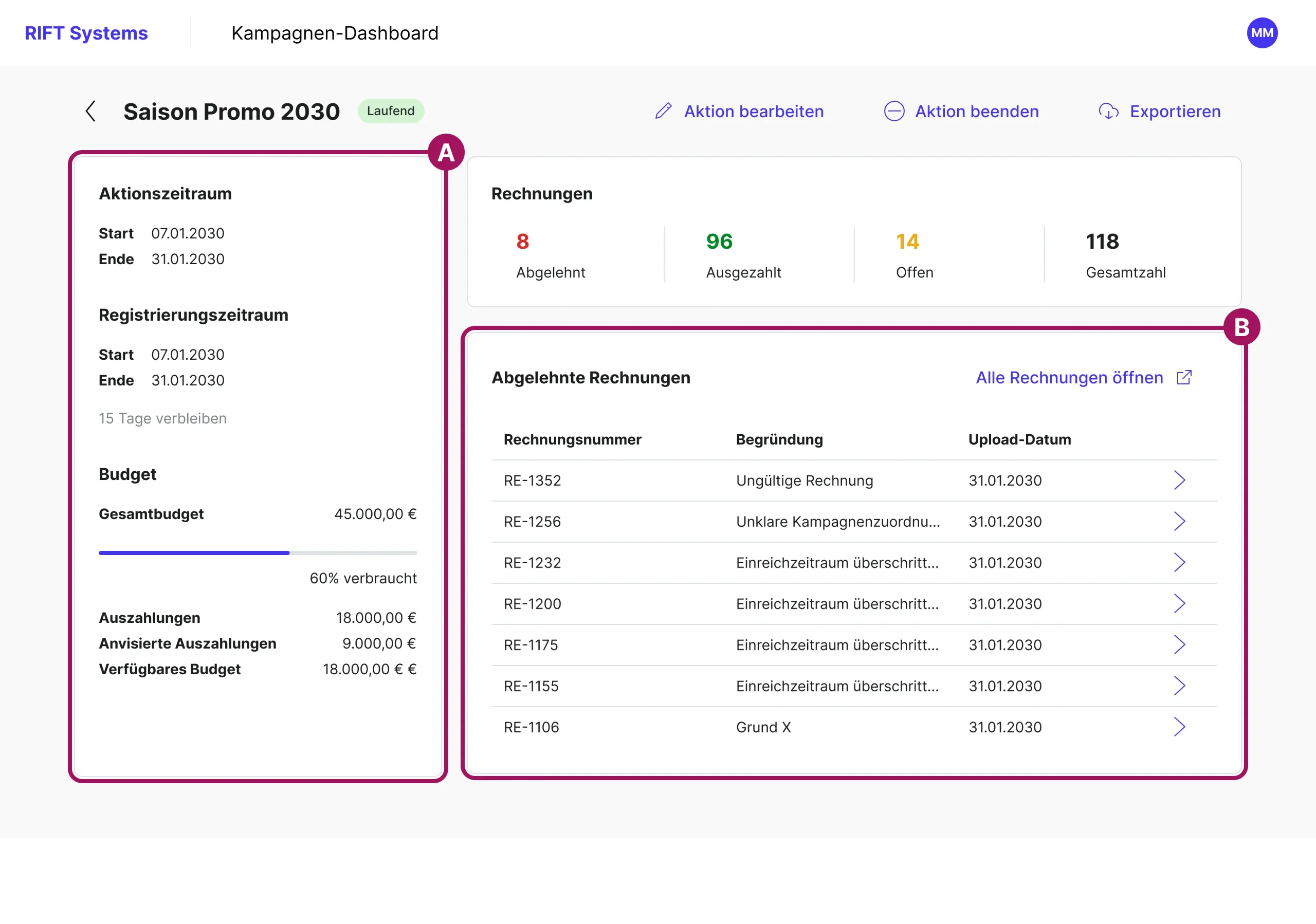
Campaign detail page.
A: Budget next to queue. Every late approval changes what is still available.
B: Rejected invoices first, on the page where the actual work on the campaign starts.
Turning incomplete requirements into review questions
The project began without a settled set of requirements. I prepared questions for the project manager to take to the client, recommended topics for stakeholder meetings, and asked the campaign team to show the tools they already used.
Because the team could react more concretely to screens than to abstract requirements, reviews became a way to test assumptions and clarify what the tool needed to support. I encouraged the second UX designer to turn unresolved issues into stakeholder questions while engineers helped us assess feasibility.
What I owned and shaped
Owned
- Campaign detail page, invoice list and flows, invoice detail with decision logic
- Role and permission model, invoice history, display of parsed invoice data
- Detailed UX work after the shared concept phase
Co-defined with a second UX designer
- Feature scope with stakeholders, and navigation, information architecture, and the consolidation into two applications with a second UX designer
Done by others
- Campaign overview and campaign creation were designed by UX colleague
- A UI designer joined shortly before the UX design was finished and handled the visual design
- Client stakeholders and engineers contributed business requirements and feasibility constraints
Designed, and not yet measured
Delivered
Together with colleagues, I helped develop a concept consolidating work previously spread across four applications into two. My UX scope included a campaign detail page with rejected-invoice queue and budget breakdown, invoice cases with required rejection reasons and decision history, role-based permissions, and parsed invoice data with visible errors.
Intended Outcome
People handling an invoice should be able to see why it was rejected, what decisions were made, and what still needs clarification. Whether the proposed workflow reduces coordination time has not been measured. The product was still in development at the time of this case study.
How I would evaluate it
- Time from initial rejection to a final decision
- Number of handovers involved in resolving an invoice case
- Share of initially rejected invoices later approved, to check how frequently exceptions occur, not as proof of UX impact
- Usability tests asking organisers to explain a case’s current state and decision history
Slider showing the reference design system from Six Day and our developed design system
How about levelling up together?
© Carla Eckhard 2026
Created with joy in the Berlin – capitol of the Currywurst 
Privacy Policy
Legal Notice